React Hooks
Hook 是 React 16.8 的新增特性。它可以让你在不编写 class 的情况下使用 state 以及其他的 React 特性。
4.useReduce()
useState 的替代方案。它接收一个形如 (state, action) => newState 的 reducer,并返回当前的 state 以及与其配套的 dispatch 方法。
在某些场景下,useReducer 会比 useState 更适用,例如 state 逻辑较复杂且包含多个子值,或者下一个 state 依赖于之前的 state 等。并且,使用 useReducer 还能给那些会触发深更新的组件做性能优化,因为你可以向子组件传递 dispatch 而不是回调函数 。
1
2
3
4
5
6
7
8
9
10
11
12
13
14
15
16
17
18
19
20
21
22
23
| const initialState = {count: 0};
function reducer(state, action) {
switch (action.type) {
case 'increment':
return {count: state.count + 1};
case 'decrement':
return {count: state.count - 1};
default:
throw new Error();
}
}
function Counter() {
const [state, dispatch] = useReducer(reducer, initialState);
return (
<>
Count: {state.count}
<button onClick={() => dispatch({type: 'decrement'})}>-</button>
<button onClick={() => dispatch({type: 'increment'})}>+</button>
</>
);
}
|
惰性初始化
你可以选择惰性地创建初始 state。为此,需要将 init 函数作为 useReducer 的第三个参数传入,这样初始 state 将被设置为 init(initialArg)。
这么做可以将用于计算 state 的逻辑提取到 reducer 外部,这也为将来对重置 state 的 action 做处理提供了便利:
1
2
3
4
5
6
7
8
9
10
11
12
13
14
15
16
17
18
19
20
21
22
23
24
25
26
27
28
29
30
31
| function init(initialCount) {
return {count: initialCount};
}
function reducer(state, action) {
switch (action.type) {
case 'increment':
return {count: state.count + 1};
case 'decrement':
return {count: state.count - 1};
case 'reset':
return init(action.payload);
default:
throw new Error();
}
}
function Counter({initialCount}) {
const [state, dispatch] = useReducer(reducer, initialCount, init);
return (
<>
Count: {state.count}
<button
onClick={() => dispatch({type: 'reset', payload: initialCount})}>
Reset
</button>
<button onClick={() => dispatch({type: 'decrement'})}>-</button>
<button onClick={() => dispatch({type: 'increment'})}>+</button>
</>
);
}
|
5.useMemo()与useCallback()
把内联回调函数及依赖项数组作为参数传入 useCallback,它将返回该回调函数的 memoized 版本,该回调函数仅在某个依赖项改变时才会更新。当你把回调函数传递给经过优化的并使用引用相等性去避免非必要渲染(例如 shouldComponentUpdate)的子组件时,它将非常有用。
memo是用来优化函数组件的重渲染问题,当传入的属性值都没变化时就不会触发组件的重渲染,否则组件就会重渲染。和类组件中的PureComponent组件是类似。
useMemo功能是判断组件中的函数逻辑是否重新执行,用来优化性能。
1
2
3
4
5
6
7
8
9
10
11
12
13
14
15
16
17
18
19
20
21
22
23
24
25
26
27
28
29
30
31
32
33
34
35
| import React, { useState, useMemo } from 'react';
import './App.css';
function Count(props) {
return <div>子组件count值:{props.count}</div>
}
function App(props) {
const [count, setCount] = useState(0);
const double = useMemo(() => {
return count * 2;
}, [count])
return (
<div className="app">
<p>父组件count值:{count}</p>
<Count count={count} />
<button
onClick={() => {
setCount(count + 1)
}}>
Add
</button>
<div>double值:{double}</div>
</div>
)
}
export default App;
|
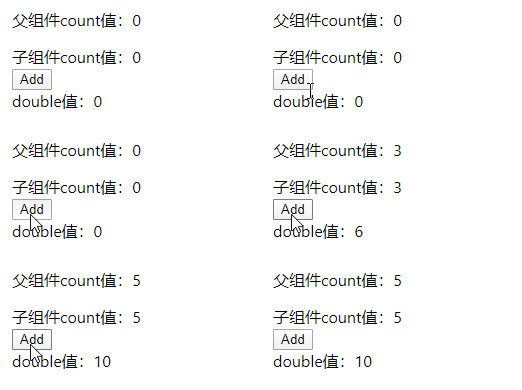
此时的父组件、子组件以及double值都会随着一起改变
现在修改传入函数的值
1
2
3
| const double = useMemo(() => {
return count * 2;
}, [count===3])
|
效果:
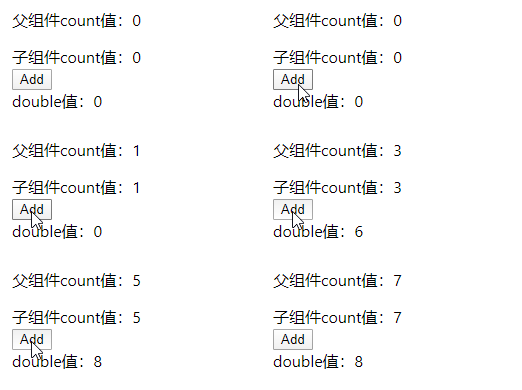
count===3会从false变为true,再变成false。中间发生了两次变化。所以double的值发生了两次变化。
接着优化组件渲染问题:
1
2
3
4
5
6
7
8
9
10
11
12
13
14
15
16
17
18
19
20
21
22
23
24
25
26
27
28
29
30
31
32
33
34
35
36
| import React, { useState, memo, useMemo } from 'react';
import './App.css';
const Count = memo(function Count(props) {
console.log('count render')
return <div>子组件count值:{props.double}</div>
})
function App(props) {
const [count, setCount] = useState(0);
const double = useMemo(() => {
return count * 2;
}, [count === 3])
return (
<div className="app">
<p>父组件count值:{count}</p>
<Count double={double} />
<button
onClick={() => {
setCount(count + 1)
}}>
Add
</button>
<div>double值:{double}</div>
</div>
)
}
export default App;
|
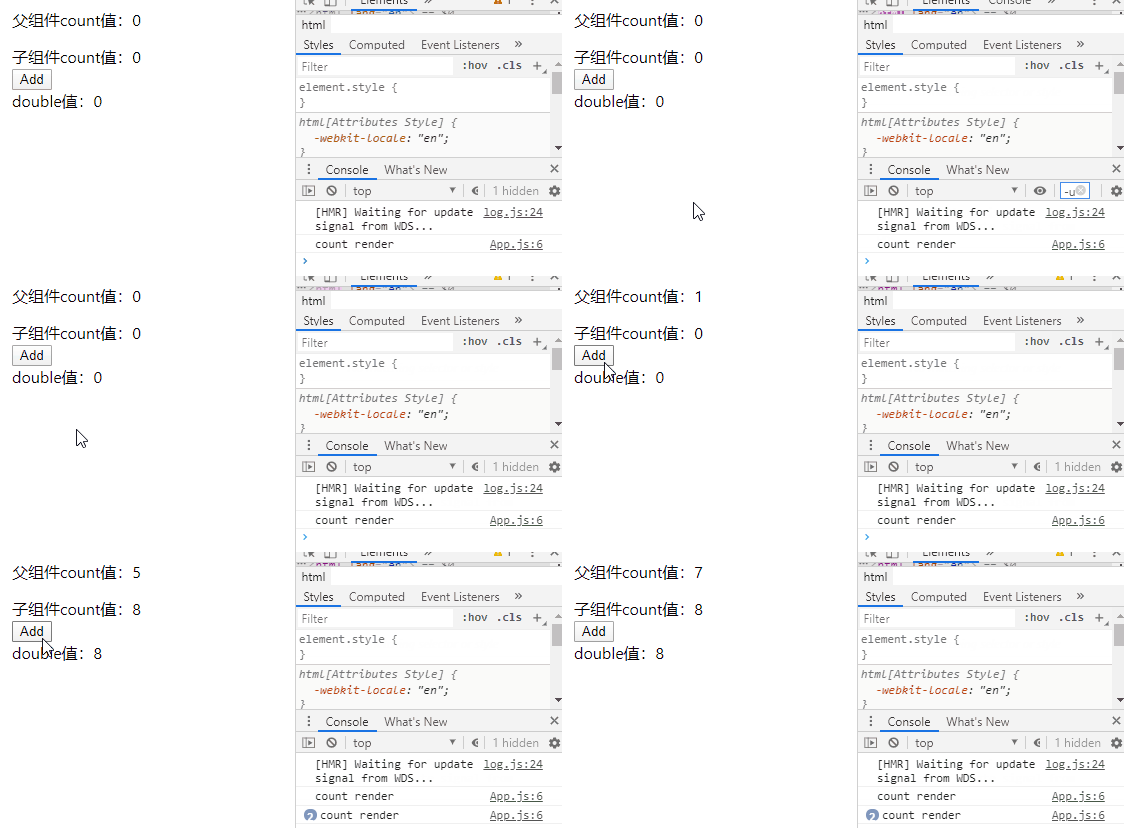
结果如下:
接着向Count子组件中传入onClick方法,看Count子组件是否会被重新渲染:
1
2
3
4
5
6
7
8
9
10
11
12
13
14
15
16
17
18
19
20
21
22
23
24
25
26
27
28
29
30
31
32
33
34
35
36
37
38
39
| import React, { useState, memo, useMemo } from 'react';
import './App.css';
const Count = memo(function Count(props) {
console.log('count render')
return <div onClick={props.onClick}>子组件count值:{props.double}</div>
})
function App(props) {
const [count, setCount] = useState(0);
const double = useMemo(() => {
return count * 2;
}, [count === 3])
const onClick = () =>{
console.log('click')
}
return (
<div className="app">
<p>父组件count值:{count}</p>
<Count double={double} onClick={onClick}/>
<button
onClick={() => {
setCount(count + 1)
}}>
Add
</button>
<div>double值:{double}</div>
</div>
)
}
export default App;
|
效果:
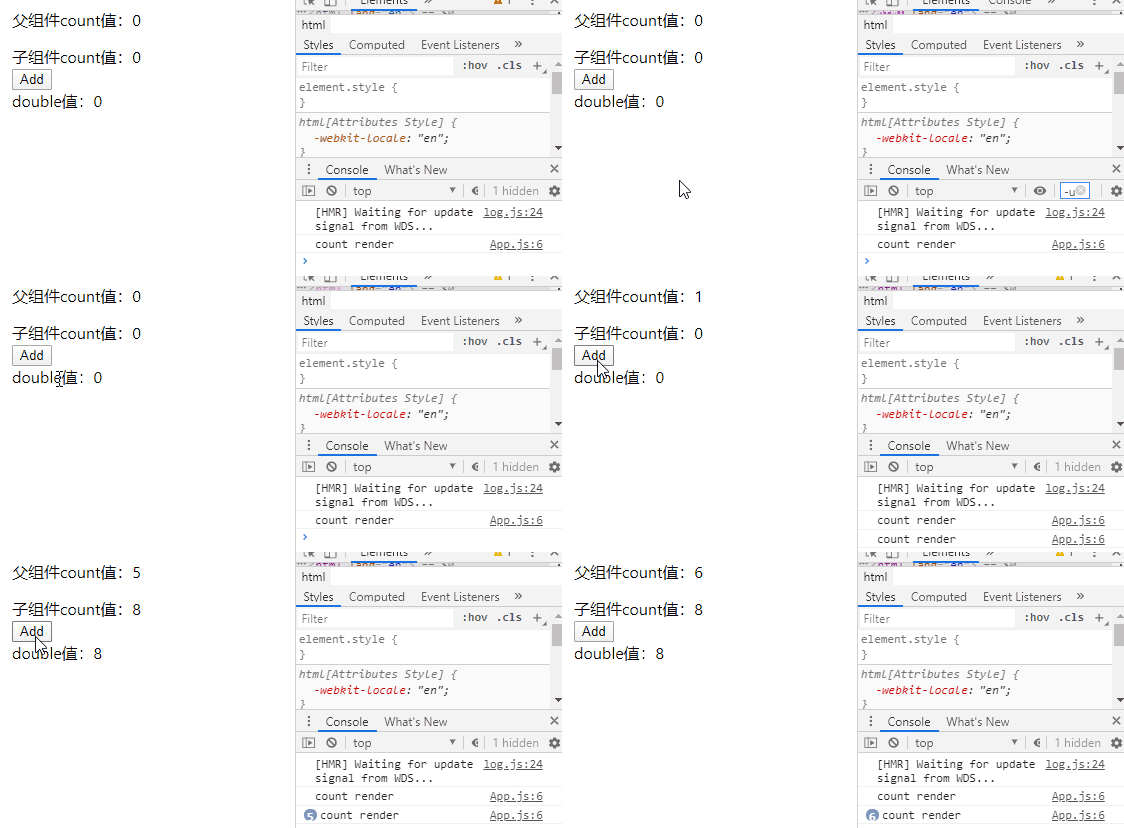
App父组件发生变化重新渲染后,onClick句柄也发生了变化,导致Count子组件每次也会被重渲染,即使传入的double值没有发生变化。此时就需要让onClick句柄不发生变化。让onClick为useMemo的返回值:
1
2
3
4
5
6
7
8
9
10
11
12
|
const onClick = useMemo(() => {
return () => {
console.log('click')
}
}, []);
|
如果useMemo返回的是一个函数,则可以用useCallback省略顶层的函数。 将包裹的onClick函数用useCallback包裹:
1
2
3
4
5
6
7
8
9
10
11
12
13
14
15
16
17
|
const onClick = useCallback(() => {
console.log('click')
}, []);
|
因此useCallback是useMemo的变体。
1
2
3
| useMemo(()=>return fn,deps);
useCallback(fn,deps);
|
6.useRef
useRef 返回一个可变的 ref 对象,其 .current 属性被初始化为传入的参数(initialValue)。返回的 ref 对象在组件的整个生命周期内持续存在。
1
2
3
4
5
6
7
8
9
10
11
12
13
| function TextInputWithFocusButton() {
const inputEl = useRef(null);
const onButtonClick = () => {
inputEl.current.focus();
};
return (
<>
<input ref={inputEl} type="text" />
<button onClick={onButtonClick}>Focus the input</button>
</>
);
}
|